
Stats

Lanterns Roblox Stats Guide and Point Budget Planner

Last updated:

Build around the effects you need, then check your point budget before spending. Lantern Build lets you invest in Willpower, Intelligence, Energy, and Vitality, with separate readouts for your class and Ring Mastery.

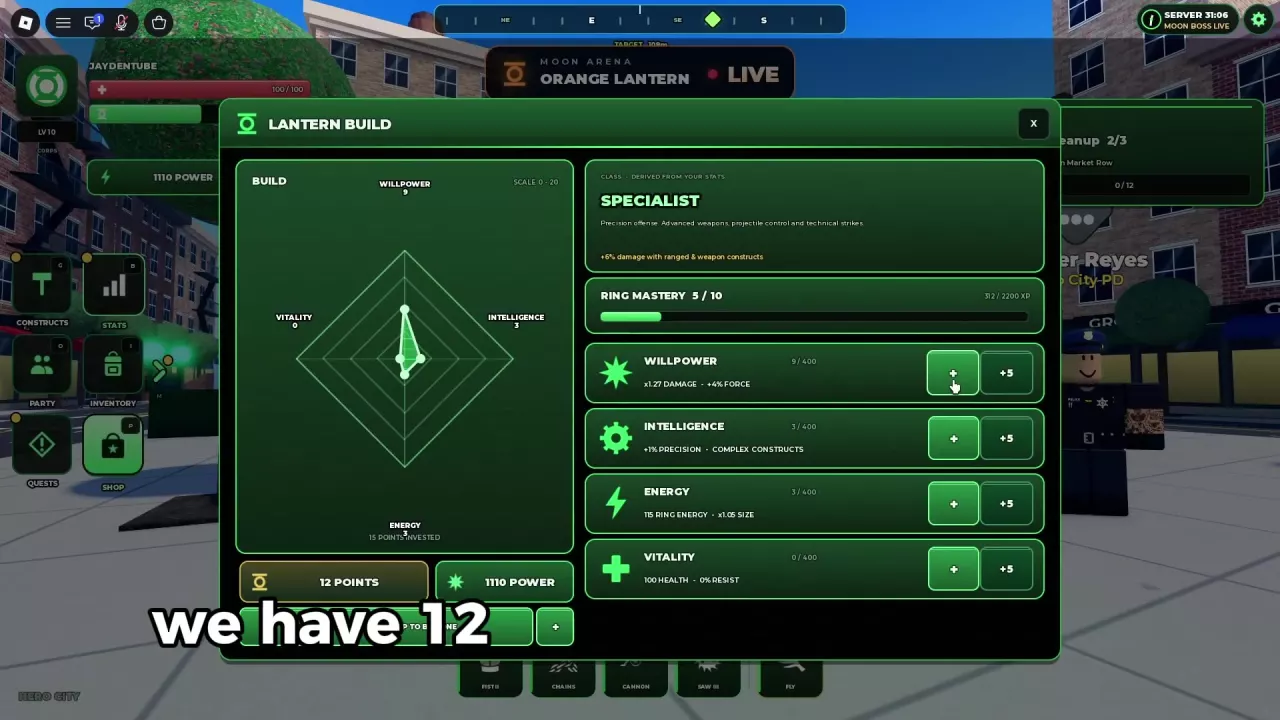
Willpower supports Damage and Force; Intelligence supports Precision and Complex Constructs; Energy supports Ring Energy capacity and Size; Vitality supports Health and Resist. Press B to open Stats and use + or +5 to allocate points. Each attribute displays a 400-point cap. The planner calculates your final allocations, points required, remaining budget, and points above those caps. Find the available respec option at the bottom of Lantern Build.

Plan additional points in the four-stat Lantern Build system.

Final stat = current stat + added points. Cost = sum of added points. Remaining budget = available points − cost. Excess = sum of amounts above each stat cap.

  • This plan only adds points; reducing an existing allocation requires a reset.
  • A negative remaining budget or a positive excess means the plan needs adjustment.
  • Class, damage and Power are not calculated.

What Each Stat Changes

Choose an attribute according to the improvement you need:

  • Willpower: Prioritize it when your main goal is more damage.
  • Intelligence: Invest toward Precision and the requirements of complex constructs you want to use.
  • Energy: Favor it when you need a larger Ring Energy reserve. The Energy attribute is an allocation of points; the Ring Energy readout is your capacity.
  • Vitality: Give it attention when surviving hits is your main problem, since it supports both Health and Resist.

Read the effects beneath each attribute as you spend. For example, moving from 17 to 18 Willpower changes the displayed damage multiplier from ×1.51 to ×1.54, while Force remains +5%. Moving from 7 to 8 Intelligence still displays +2% Precision. A point increase does not necessarily change every displayed bonus immediately.

Your attributes also help determine your class. Compare Specialist and Vanguard for class bonuses and combat roles, or use the combat loadout guide to connect your stat priorities with a specific set of abilities.

  • Willpower

    Effects
    Damage and Force (Four-attribute Lantern Build)
    Displayed point cap
    400 points (Four-attribute Lantern Build)
  • Intelligence

    Effects
    Precision and Complex Constructs (Four-attribute Lantern Build)
    Displayed point cap
    400 points (Four-attribute Lantern Build)

  • Energy

    Effects
    Ring Energy capacity and Size (Four-attribute Lantern Build)
    Displayed point cap
    400 points (Four-attribute Lantern Build)
  • Vitality

    Effects
    Health and Resist (Four-attribute Lantern Build)
    Displayed point cap
    400 points (Four-attribute Lantern Build)

Allocate Points in Lantern Build

  1. Press B to open Stats, or press M to expand the side menu and select Stats.
  2. Check your available POINTS beneath the build chart and your current allocation beside each attribute. Ring Mastery has its own progress bar above the attribute rows.
  3. Click + to add one point or +5 to add five points to the chosen attribute. Watch the total after each click, especially when aiming for a specific unlock requirement.
  4. Check the updated attribute totals and effect labels, then close the panel with its upper-right X.

When fewer than five points remain, +5 disappears. When no points remain, + turns gray. For a precise target, use single-point clicks for the last few points.

Allocating points can also raise the displayed Power value. Use the individual Damage, energy, and defensive readouts to understand your investment.

Lantern Build showing four attributes, 12 available points, + and +5 buttons, and a separate Ring Mastery bar.

Plan Additional Stat Points

Enter your available unspent points, your current four attributes, and the additional points you want to put into each one. In the Energy input, enter your allocated Energy points, not your Ring Energy capacity or current charge.

Read the results together:

  • Final attributes show your current allocations plus the planned additions.
  • Points required is the total cost of those additions.
  • Remaining budget shows how many unspent points you would have left. A negative result means you need more points or a smaller allocation.
  • Points above stat caps adds up the excess above 400 across the four attributes. Any positive result means at least one final attribute needs to be reduced.

A plan fits when the remaining budget is zero or higher and points above stat caps is zero. Spare budget does not make an over-cap allocation valid.

A 12-point allocation

Starting at 9 Willpower, 3 Intelligence, 3 Energy, and 0 Vitality, add 7, 3, 2, and 0 points respectively. This costs 12 points and produces 16 / 6 / 5 / 0. With 12 points available, the remaining budget is 0, all four attributes stay below their caps, and total invested points rise from 15 to 27.

To apply that plan, add seven points to Willpower, three to Intelligence, and two to Energy. This puts most of the new investment into damage while also increasing Precision and energy capacity. Leaving Vitality at 0 keeps its readout at 100 Health and 0% Resist, so consider a different split if survival is your priority.

The planner handles additional allocations. To lower an existing stat and redistribute those points, use the respec route. Its results are point totals, not predictions of class, Power, or combat damage. The calculator’s Reset restores its default inputs; it does not reset your character.

Resetting Points and Checking Unlock Gaps

Find your respec option

Open Stats with B and check the bottom of Lantern Build. The available route depends on the reset status shown there:

  • FREE RESPEC (1) — REFUND ALL POINTS: The label indicates one available free reset that returns your allocated points for redistribution.
  • Spec Resets with no available uses: Use the purchase entry if you want to obtain a reset, and check the offer before buying.

Use the availability shown on your own panel when planning a redistribution.

Calculate an attribute unlock gap

Read an attribute requirement as current value / required value. If a construct shows WIL 9/10, you have 9 Willpower and need 1 more point to meet that attribute requirement. The gap is the required value minus your current value, or zero if you already meet it.

Meeting the attribute requirement does not remove other conditions such as player level, Ring Mastery, Coins, or Corps restrictions. Check the selected ability’s remaining requirements in the construct directory and unlock guide before committing points solely to unlock it.

If your menu has only three stats

The older Stats interface uses Health, Ring Energy, and Damage, each with a displayed cap of 400. It includes next-point previews and labels allocations permanent. Keep those allocations separate from the four-stat Lantern Build planner; do not enter old Health or Damage points as Vitality or Willpower.

Lanterns Roblox Stats Guide and Point Budget Planner — illustrated cover

Search the wiki

Lanterns Roblox Corps: Ring Colors, Access and Separate SavesCompare all six Corps in Lanterns Roblox, learn how switching preserves separate saves, and unlock Orange Lantern with its 400 Robux game pass.Lanterns Roblox Constructs: Abilities, Unlocks and LoadoutsLook up Lanterns Roblox constructs, read unlock requirements, equip four ability slots, and learn how Platform, Gatling, Orbital Battery and ability levels work.Lanterns Roblox Stats Guide and Point Budget PlannerLearn what Lanterns Roblox stats affect, allocate and reset points, and use the stat point calculator to check your budget and each attribute’s 400-point cap.Lanterns Classes: Specialist vs VanguardCompare Specialist and Vanguard in Roblox Lanterns: class bonuses, Unformed status, example stat allocations, and which direction fits your combat style.Lanterns Roblox Construct Loadouts for Street Combos, Farming and Pumpkin KingChoose Lanterns Roblox construct loadouts for street combos, Rage and Anvil farming, or Pumpkin King, with slot assignments, stat advice, and energy tips.Lanterns Roblox Early Game Construct Tier ListChoose constructs for early Lanterns Roblox street quests. Compare Saw, Fist, Hammer, Chains and five alternatives, then build a practical four-slot loadout.Lanterns Roblox Leveling and Ring Mastery GuideFind Lanterns Roblox leveling areas, combine quests with extra XP sources, check Ring Mastery unlocks, and calculate the XP left on your current mastery bar.Lanterns Roblox PC Controls: Flight, Recharge and ShieldsLearn Lanterns Roblox PC controls: activate a dormant ring, fly with F, recharge with E, switch targets, block and use Shield Envelop.Lanterns Roblox Settings: Auto Suit, Ring Activation and AudioAdjust Lanterns settings in Roblox: turn off Auto Suit, keep your ring ready, wear your uniform manually, and control music, sound and recharge oaths.Lanterns Roblox Quests: Objectives, NPCs and Turn-InsFind Lanterns Roblox quest objectives, NPC locations, daily tasks and Halloween targets. Learn why Market Cleanup needs a return trip after 12/12.Lanterns Roblox Locations: Area Levels, Landmarks and TravelBrowse 20 Lanterns Roblox locations, compare area level signs, find city landmarks, and follow quest markers across the sea to Prison Island.Lanterns Roblox Enemy Locations, Quest Targets and Combat TipsFind all 11 Lanterns enemy types, match Halloween quest targets, and learn how to handle Thug health resets, harbor robots, and graveyard fights.Lanterns Roblox Bosses: Locations, Summons and RewardsFind Lanterns Roblox bosses, compare Moon raids and Halloween summons, check offering requirements, and learn how boss chests, titles and quest rewards work.Lanterns Roblox Moon Raids: Travel, Timers and ParticipationLearn how to reach the Moon in Lanterns Roblox, read boss timers and LIVE banners, qualify for a personal chest, and find Lantern Herald.Lanterns Roblox Boss Summoning Recipes and Offering PlannerFind all three Lanterns Halloween boss summoning recipes, calculate missing offerings, collect or buy materials, and use the Pumpkin Planet altar.Lanterns Roblox Pumpkin King: Summon, Fight and RewardsSummon Pumpkin King in Lanterns Roblox with 10 Bones and 20 Cursed Seed, attack vulnerable windows, block projectiles and finish Hunter Crane's quest.Lanterns Roblox Boss Damage CalculatorCalculate your boss damage contribution in Lanterns on Roblox, the 5% personal chest requirement, and how much more damage you need.Lanterns Roblox Resources: Currencies and Summoning MaterialsFind Candy and Lantern Coin sources in Roblox Lanterns, collect the four Halloween offerings, and reserve materials for your next boss summon.Lanterns Roblox Shops: Candy Items, Passes and Boost PricesFind Madame Hex and Lantern Shop in Roblox Lanterns, compare Candy items and Robux passes, and choose purchases for summons, leveling, drops or outfits.Lanterns Roblox Candy Budget GuideCalculate your Madame Hex shopping total in Lanterns Roblox. Budget for chests, offerings, and boosts, then find how much more Candy you need.Lanterns Roblox Chests: Sources, Storage and Opening GuideFind chest sources in Lanterns Roblox, check the boss damage requirement, and learn how to buy and open a Legendary Chest for 2,500 Candy.Lanterns Roblox Boosts: XP Stacking, Luck and DurationLearn how Lanterns Roblox boosts combine for 4x XP, how the 2x Luck cap works, which durations are available, and where to check your boost timer.Lanterns Roblox Halloween Event and Pumpkin Planet GuideFind Pumpkin Planet in Lanterns Roblox, locate quests and shops, choose Halloween activities, and learn trick-or-treating, Crimson Moon and Pumpkin Hunt rules.Lanterns Roblox Halloween Pass: Rewards and Event XP PlannerCheck Lanterns Roblox Halloween pass rewards for tiers 1–6, compare event XP sources, and calculate quests, enemies or bosses needed for your target.Lanterns Roblox Aura Previews: Halloween Appearance GuideCompare five Halloween aura previews in Lanterns Roblox, find Inventory > Auras, check lock status, and learn how aura display and saving work.Lanterns Roblox Titles: Collection and Known UnlocksBrowse all 11 Lanterns Roblox titles, preview Regular and Halloween styles, and learn how to get Supporter, Owner and Pumpkin King Slayer.Lanterns Roblox Suits: Corps Uniform and Halloween ShopFind Corps Standard in Inventory, press U to wear your Corps uniform, turn off Auto Suit, and locate Madame Hex's Halloween suit shop in Lanterns Roblox.CodesUpdates