
Builds

Lanterns Roblox Construct Loadouts for Street Combos, Farming and Pumpkin King

Last updated:

Build your four construct slots around the fight ahead. Use Chains to set up street combos, Rage and Anvil to handle nearby groups, or an aerial ranged setup for Pumpkin King. Start with abilities you own, then adjust your attack rhythm and stats to support them.

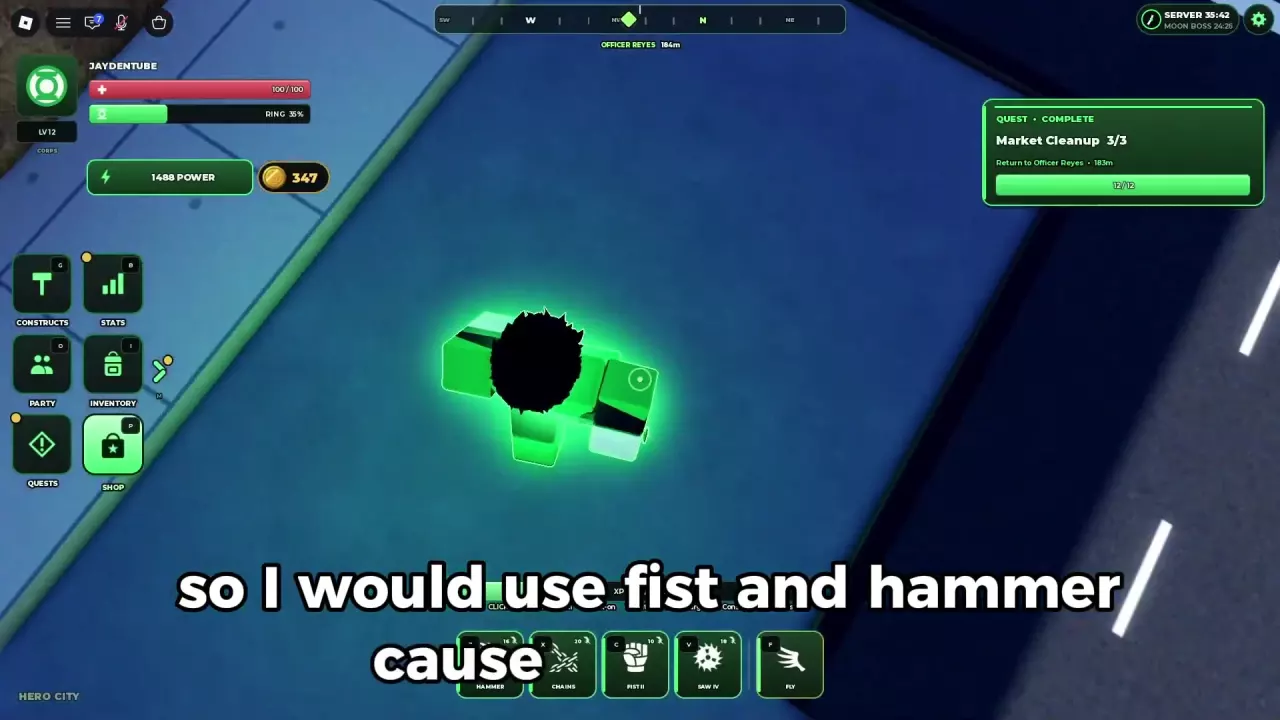
For street quests, equip Z: Hammer, X: Chains, C: Fist, and V: Saw. Use X → C → V or X → Z → V. Before unlocking Hammer at player level 5 and Chains at level 10, rely on your available Fist, Saw, and Energy Blast. For groups, use Rage for area attacks and Anvil for heavy hits, supported by Missiles and shielding. If you own Cannon, Dex-Starr, Missiles, and Orbital Battery, use them for aerial ranged pressure against Pumpkin King, attacking during vulnerable windows and blocking incoming projectiles.

Choose a Loadout for Your Current Task

Your task Recommended setup Why it fits
Early street quests and Market Row Hammer, Chains, Fist, Saw Chains sets up follow-up attacks; Fist or Hammer provides the next hit, and Saw can connect again on its return.
Groups at Iron Harbor or Prison Island Rage, Anvil, Missiles, with shield protection Rage handles nearby groups, Anvil adds a heavy hit, and Missiles provides a ranged option.
Pumpkin King Cannon, Dex-Starr, Missiles, Orbital Battery Supports ranged attacks while flying or hovering, with movement and shielding between attack windows.

Choose from your unlocked abilities. The street setup is a practical early goal; the farming and Pumpkin King configurations are options once you own their constructs.

For individual early-game picks, see the street combat construct tier list. Use the construct directory to check a particular ability's unlock requirements.
Green Street Combos and Early Substitutions

Aim for Z: Hammer, X: Chains, C: Fist, V: Saw. Hammer requires player level 5, while Chains requires player level 10. Fist II and Saw IV are ability levels in this setup; use the versions you currently have unlocked.

Equip the four slots

  1. Press G to open Constructs.
  2. Remove an unwanted ability with the red × in YOUR LOADOUT.
  3. Select the replacement construct, click EQUIP, and choose its slot. Slots 1–4 correspond to Z, X, C, V.
  4. Assign Hammer to Z, Chains to X, Fist to C, and Saw to V. Check the hotbar before fighting—moving Fist from Z to C also changes its combo input.

Use Chains to open the combo

  1. Target the street enemy and cast Chains with X.
  2. Follow with Fist on C, or aim Hammer on Z at the enemy's position.
  3. Cast Saw with V. Its outward and returning passes give it two opportunities to connect.

That gives you two useful sequences:

  • X → C → V: Chains → Fist → Saw, for a direct follow-up attack.
  • X → Z → V: Chains → Hammer → Saw, for an aimed hammer slam after the control opener.

Keep Chains at the start so the follow-up attacks benefit from its control. These are street-combat sequences; use the ranged setup below when preparing for Pumpkin King.

Before Hammer or Chains is available

Use your available Fist and Saw, with click-based Energy Blast between construct attacks. Approach under shield protection, lower the shield to attack, then back away while continuing ranged pressure. If you already have Jet equipped, it can fill the retreating attack step before Saw.

Add Hammer once it becomes available, then add Chains when you meet its requirement. You can keep progressing with the simpler setup while working toward those unlocks; the leveling guide covers where to take your next quests.

Green Lantern hotbar with Hammer on Z, Chains on X, Fist II on C, and Saw IV on V.

A Willpower-Focused Stat Example

A concrete offensive example for the Green setup uses 33 invested points:

Attribute Allocated points
Willpower 18
Intelligence 8
Energy 7
Vitality 0

This favors Willpower while maintaining smaller investments in Intelligence and Energy. At these values, the panel shows ×1.54 Damage and 135 Ring Energy. The associated Specialist class provides +6% ranged and weapon construct damage, which suits a build focused on those attacks.

The tradeoff is survivability: 0 Vitality leaves this example at 100 Health and 0% Resist from Vitality. If taking hits regularly ends your fights, consider investing in Vitality instead of copying the offensive allocation unchanged.

Treat 18/8/7/0 as a workable example, not an optimal ratio or a required recipe for Specialist. Classes form from attribute allocation. For a frontline direction, Vanguard's +6% Ram & Structural Force and +3% Damage Resistance favor impact and durability; see the Specialist versus Vanguard comparison for that choice. Use the stat-point planner to fit additional investments into your available budget.

Rage and Anvil for Groups

If you already own Rage and Anvil, build around their different jobs: Rage supplies a nearby area attack, while Anvil delivers a heavy hit. Add Missiles for ranged attacks and weave in click-based Energy Blast.

The older four-slot configuration is Z: Rage IV, X: Anvil Drop V, C: Energy Shield III, V: Missile Pod III. Its combat rhythm is:

  1. Start at range with Energy Blast; use Missiles when you need a ranged construct option.
  2. Use Anvil for a heavy hit as you engage.
  3. Trigger Rage when enemies are nearby so its area attack can reach the group.
  4. Use shield protection as needed and watch its separate durability bar before moving to the next group.

This suits clustered enemies better than treating every target as a separate Chains combo. Choose attacks according to enemy position and available cooldowns rather than forcing a fixed repeating sequence.

Adjust the shield slot to your controls

In the later shield system, right-click while in Shift Lock raises the shield without consuming a construct slot. Holding left-click while blocking produces Shield Envelop. That frees the older C slot; keep the Rage/Anvil/Missiles core and use the remaining slot for an unlocked ability you find useful. C is only the older setup's assigned shield key.

The older build also allocated 57 points to Health, 65 to Ring Energy, and 172 to Damage in the three-stat system. Those values belong to that system and should not be copied into the four-stat Lantern Build allocation above.

Aerial Ranged Setup for Pumpkin King

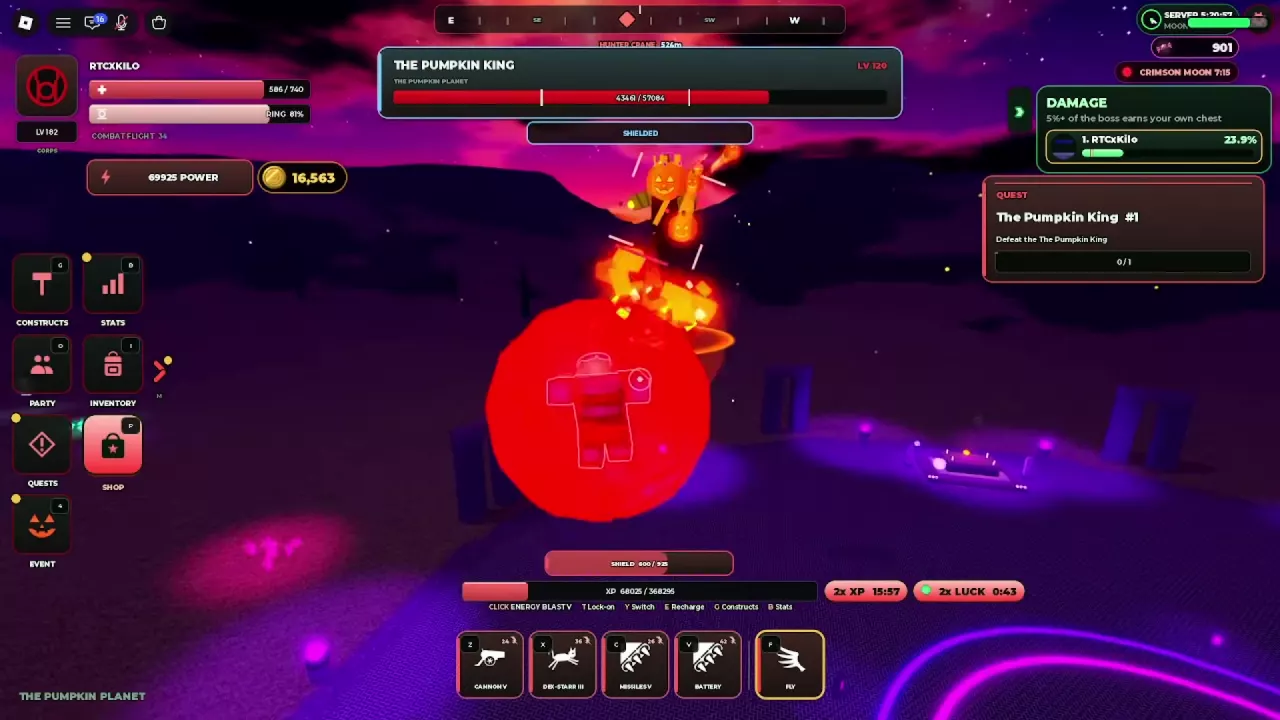
If you own all four abilities, equip Z: Cannon, X: Dex-Starr, C: Missiles, V: Orbital Battery. Battery is the hotbar name for Orbital Battery in this setup. Its four hard-light emitters orbit you and fire coordinated volleys at the target for several seconds, making it a useful companion to your other ranged attacks.

For an owned Orbital Battery, open Inventory → Orbital Battery → EQUIP IN CONSTRUCTS, then assign it to V.

Use this rhythm during the fight:

  1. Fly and acquire the target. Press F to take off with your ring active, then keep Pumpkin King locked on. Move close enough for your attacks to connect.
  2. Hover to attack. Use your ranged abilities from a position where you can maintain pressure and still reposition.
  3. Attack during VULNERABLE · STRIKE NOW. Use that phase as your main opportunity to commit to offense.
  4. Respond to approaching pumpkin projectiles. Pull away or face the incoming attack and raise your shield. Watch shield durability while blocking.
  5. Lower the shield and resume attacks after the volley. Alternate attacking, repositioning, and defending as the fight continues.

The value of this setup is its aerial ranged playstyle and defensive rhythm. Choose it when you can maintain that rhythm with the constructs you own. For the full preparation, summoning, phase handling, and quest return, follow the Pumpkin King guide.

A flying Red Lantern blocks Pumpkin King's projectiles inside a spherical shield.

Keep Energy Available Between Fights

Flight and attacks draw on the same Ring Energy supply. Check the RING meter before starting another group or committing to an aerial attack window, and leave yourself enough energy to reposition.

  1. Move to a position where you can pause, then use E to recharge according to the prompt on your HUD. The older control scheme uses a hold; another interface displays E TAP.
  2. Stay still while RECHARGING is active.
  3. If MOVED - RECHARGE STOPPED appears, stop moving and use E again.
  4. Watch the meter refill before resuming attacks or travel.

Also follow your current HUD for targeting: T locks on and Y switches targets in the newer layout, while the older layout uses R and T. Keeping the intended target selected helps you direct each follow-up in a combo. The PC controls guide covers the complete movement, targeting, and shield controls.

Lanterns Roblox Construct Loadouts for Street Combos, Farming and Pumpkin King — illustrated cover

Search the wiki

Lanterns Roblox Corps: Ring Colors, Access and Separate SavesCompare all six Corps in Lanterns Roblox, learn how switching preserves separate saves, and unlock Orange Lantern with its 400 Robux game pass.Lanterns Roblox Constructs: Abilities, Unlocks and LoadoutsLook up Lanterns Roblox constructs, read unlock requirements, equip four ability slots, and learn how Platform, Gatling, Orbital Battery and ability levels work.Lanterns Roblox Stats Guide and Point Budget PlannerLearn what Lanterns Roblox stats affect, allocate and reset points, and use the stat point calculator to check your budget and each attribute’s 400-point cap.Lanterns Classes: Specialist vs VanguardCompare Specialist and Vanguard in Roblox Lanterns: class bonuses, Unformed status, example stat allocations, and which direction fits your combat style.Lanterns Roblox Construct Loadouts for Street Combos, Farming and Pumpkin KingChoose Lanterns Roblox construct loadouts for street combos, Rage and Anvil farming, or Pumpkin King, with slot assignments, stat advice, and energy tips.Lanterns Roblox Early Game Construct Tier ListChoose constructs for early Lanterns Roblox street quests. Compare Saw, Fist, Hammer, Chains and five alternatives, then build a practical four-slot loadout.Lanterns Roblox Leveling and Ring Mastery GuideFind Lanterns Roblox leveling areas, combine quests with extra XP sources, check Ring Mastery unlocks, and calculate the XP left on your current mastery bar.Lanterns Roblox PC Controls: Flight, Recharge and ShieldsLearn Lanterns Roblox PC controls: activate a dormant ring, fly with F, recharge with E, switch targets, block and use Shield Envelop.Lanterns Roblox Settings: Auto Suit, Ring Activation and AudioAdjust Lanterns settings in Roblox: turn off Auto Suit, keep your ring ready, wear your uniform manually, and control music, sound and recharge oaths.Lanterns Roblox Quests: Objectives, NPCs and Turn-InsFind Lanterns Roblox quest objectives, NPC locations, daily tasks and Halloween targets. Learn why Market Cleanup needs a return trip after 12/12.Lanterns Roblox Locations: Area Levels, Landmarks and TravelBrowse 20 Lanterns Roblox locations, compare area level signs, find city landmarks, and follow quest markers across the sea to Prison Island.Lanterns Roblox Enemy Locations, Quest Targets and Combat TipsFind all 11 Lanterns enemy types, match Halloween quest targets, and learn how to handle Thug health resets, harbor robots, and graveyard fights.Lanterns Roblox Bosses: Locations, Summons and RewardsFind Lanterns Roblox bosses, compare Moon raids and Halloween summons, check offering requirements, and learn how boss chests, titles and quest rewards work.Lanterns Roblox Moon Raids: Travel, Timers and ParticipationLearn how to reach the Moon in Lanterns Roblox, read boss timers and LIVE banners, qualify for a personal chest, and find Lantern Herald.Lanterns Roblox Boss Summoning Recipes and Offering PlannerFind all three Lanterns Halloween boss summoning recipes, calculate missing offerings, collect or buy materials, and use the Pumpkin Planet altar.Lanterns Roblox Pumpkin King: Summon, Fight and RewardsSummon Pumpkin King in Lanterns Roblox with 10 Bones and 20 Cursed Seed, attack vulnerable windows, block projectiles and finish Hunter Crane's quest.Lanterns Roblox Boss Damage CalculatorCalculate your boss damage contribution in Lanterns on Roblox, the 5% personal chest requirement, and how much more damage you need.Lanterns Roblox Resources: Currencies and Summoning MaterialsFind Candy and Lantern Coin sources in Roblox Lanterns, collect the four Halloween offerings, and reserve materials for your next boss summon.Lanterns Roblox Shops: Candy Items, Passes and Boost PricesFind Madame Hex and Lantern Shop in Roblox Lanterns, compare Candy items and Robux passes, and choose purchases for summons, leveling, drops or outfits.Lanterns Roblox Candy Budget GuideCalculate your Madame Hex shopping total in Lanterns Roblox. Budget for chests, offerings, and boosts, then find how much more Candy you need.Lanterns Roblox Chests: Sources, Storage and Opening GuideFind chest sources in Lanterns Roblox, check the boss damage requirement, and learn how to buy and open a Legendary Chest for 2,500 Candy.Lanterns Roblox Boosts: XP Stacking, Luck and DurationLearn how Lanterns Roblox boosts combine for 4x XP, how the 2x Luck cap works, which durations are available, and where to check your boost timer.Lanterns Roblox Halloween Event and Pumpkin Planet GuideFind Pumpkin Planet in Lanterns Roblox, locate quests and shops, choose Halloween activities, and learn trick-or-treating, Crimson Moon and Pumpkin Hunt rules.Lanterns Roblox Halloween Pass: Rewards and Event XP PlannerCheck Lanterns Roblox Halloween pass rewards for tiers 1–6, compare event XP sources, and calculate quests, enemies or bosses needed for your target.Lanterns Roblox Aura Previews: Halloween Appearance GuideCompare five Halloween aura previews in Lanterns Roblox, find Inventory > Auras, check lock status, and learn how aura display and saving work.Lanterns Roblox Titles: Collection and Known UnlocksBrowse all 11 Lanterns Roblox titles, preview Regular and Halloween styles, and learn how to get Supporter, Owner and Pumpkin King Slayer.Lanterns Roblox Suits: Corps Uniform and Halloween ShopFind Corps Standard in Inventory, press U to wear your Corps uniform, turn off Auto Suit, and locate Madame Hex's Halloween suit shop in Lanterns Roblox.CodesUpdates