
- Click the gear in the top-right corner of the game screen.
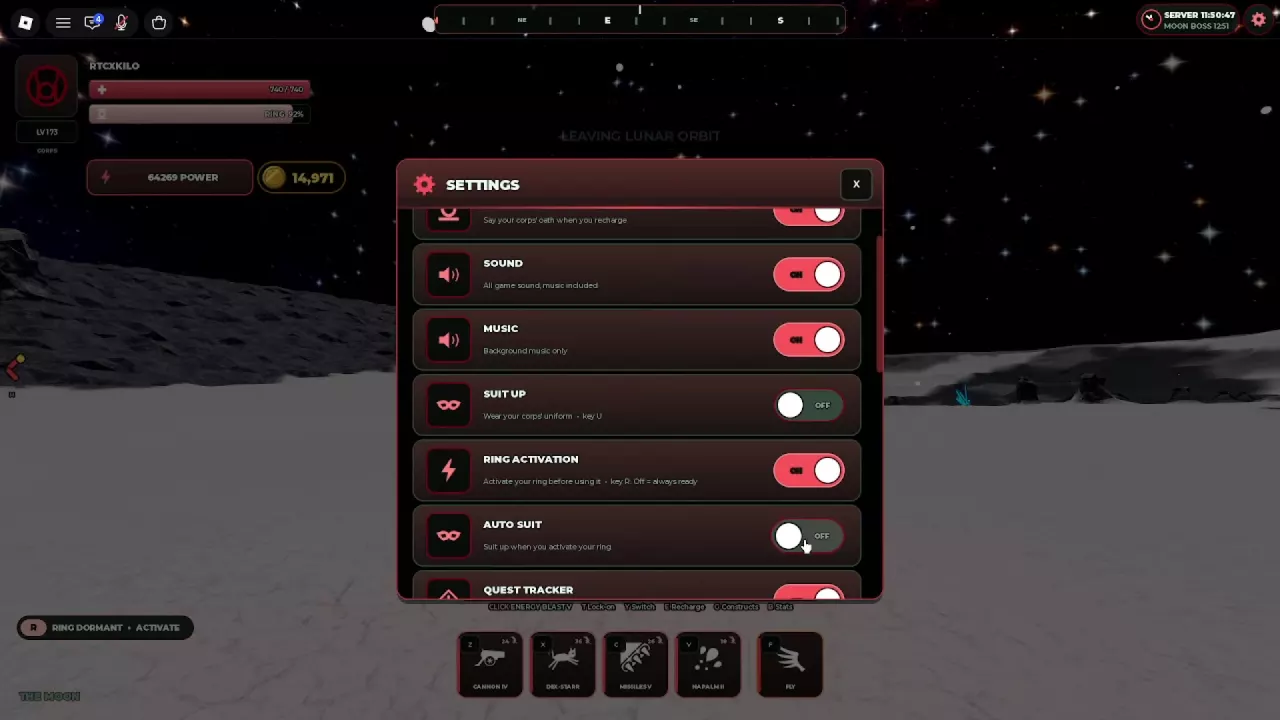
- Scroll inside the SETTINGS panel to reach the other options.
- Click an option's switch to change its ON/OFF state.
- Click the X in the panel's top-right corner when you're done.
Settings
Lanterns Roblox Settings: Auto Suit, Ring Activation and Audio
Last updated:
Use Settings to choose when your Corps uniform appears, whether your ring needs manual activation, and which game audio plays.
Click the gear in the top-right corner to open Settings. Scroll to AUTO SUIT and switch it OFF to stop ring activation from automatically equipping your Corps uniform; you can still put it on with U or SUIT UP. Turn RING ACTIVATION off to keep the ring ready. MUSIC controls background music, SOUND controls all game audio, and RING OATH controls the oath during recharge.
Open and Navigate Settings
Turn Off Auto Suit
- Open Settings using the top-right gear.
- Scroll down to AUTO SUIT.
- Switch AUTO SUIT to OFF.
Activating your ring will no longer automatically put on your Corps uniform. You can leave RING ACTIVATION on if you still want to activate the ring manually.
To put on the uniform yourself, press U or use SUIT UP. This manual control works separately from Auto Suit. For collected outfits and the clothing shop, see the Suits guide.
Keep the Ring Ready or Activate It Manually
RING ACTIVATION controls whether you need to activate the ring before using it. Choose the setting that matches how you want to play:
- ON: Press R when the HUD displays RING DORMANT · ACTIVATE to ready the ring for flight and combat abilities.
- OFF: The ring stays ready without the manual activation step. Choose this if you want to skip pressing R before using it.
This setting controls ring readiness; AUTO SUIT controls the automatic outfit change, and SUIT UP controls wearing the uniform manually. For flight, combat and recharge inputs, use the PC controls guide.
Control Sound, Music and the Recharge Oath
- Keep game effects but stop background music: Leave SOUND on and turn MUSIC off.
- Mute all game audio: Turn SOUND off. This also mutes music, even if MUSIC remains on.
- Stop reciting the Corps oath during recharge: Turn RING OATH off.
The settings reference below summarizes the six uniform, activation and audio controls.
-
Ring Activation
- Function
- Manual ring activation
- When on
- Press R to activate the ring before using it.
- When off
- The ring is always ready.
- Key
- R (RING ACTIVATION is enabled.)
-
Auto Suit
- Function
- Automatic uniform on ring activation
- When on
- Automatically puts on the Corps uniform when the ring is activated.
- When off
- Ring activation does not automatically equip the Corps uniform.
-
Suit Up
- Function
- Manual Corps uniform control
- Behavior
- Puts on the uniform of the player's Corps; controlled separately from Auto Suit.
- Key
- U
-
Ring Oath
- Function
- Corps oath during recharge
- Behavior
- Controls whether the character recites the Corps oath while recharging.
-
Sound
- Function
- All game audio, including music
- Behavior
- Controls all game sounds, including background music.
-
Music
- Function
- Background music only
- Behavior
- Controls background music separately from other game sounds.