Constructs

Lanterns Roblox Constructs: Abilities, Unlocks and Loadouts

Last updated:

44 objects

Look up construct effects, displayed unlock requirements and equipment details.

White clenched fist icon for Energy Fist.

Energy Fist

Fist · Fist II · Energy Fist III

Classification
Basic; Ranged (Basic in the Green example; Ranged in the older Red menu.)
Effect
Launches a large fist-shaped energy construct; separate from the click-based Energy Blast attack.
Player level requirement
—
Displayed Willpower requirement
—
Displayed Intelligence requirement
—
Displayed Energy attribute requirement
—
Displayed Ring Mastery requirement
—
Displayed coin requirement
—
Energy cost
10 Energy (Level 2 loadout example.)
Acquisition label
—
Ring restriction
—
More details
Observed level
2 level (Green menu example; hotbar name Fist II.)
Observed level
3 level (Older Red menu; Energy Fist III.)
Observed hit damage
39 damage (One hit in the Green Thug encounter; not a base damage specification.)
White angular Energy Sword icon.

Energy Sword

Sword · Energy Sword II

Classification
Basic; Offense (Basic in the Green example; Offense in the older Red menu.)
Effect
Creates a sword in the character's hand and swings it.
Player level requirement
—
Displayed Willpower requirement
—
Displayed Intelligence requirement
—
Displayed Energy attribute requirement
—
Displayed Ring Mastery requirement
—
Displayed coin requirement
—
Energy cost
—
Acquisition label
—
Ring restriction
—
More details
Observed level
1 level (Unlocked in the Green menu example.)
Observed level
2 level (Energy Sword II in the older Red example.)
Ring before cast
55 % (Green Sword example; an example reading, not a fixed cost.)
Ring after cast
50 % (Same Green Sword example.)
Green swinging hammer icon for Construct Hammer.

Construct Hammer

Hammer · Construct Hammer III

Classification
Common; Heavy
Effect
A giant hammer slams down at the aimed position.
Player level requirement
5 level (Displayed unlock requirement.)
Displayed Willpower requirement
—
Displayed Intelligence requirement
—
Displayed Energy attribute requirement
—
Displayed Ring Mastery requirement
—
Displayed coin requirement
—
Energy cost
16 Energy (Shown at construct level 1.)
Acquisition label
—
Ring restriction
—
More details
Displayed time parameter
4 seconds (Level 1 detail panel.)
Observed level
1 level (Green equipment example.)
Observed level
3 level (Construct Hammer III in the older Red example.)
White staircase icon for Construct Stairs.

Construct Stairs

Classification
Mobility / Utility (Older Red menu.)
Effect
—
Player level requirement
—
Displayed Willpower requirement
—
Displayed Intelligence requirement
—
Displayed Energy attribute requirement
—
Displayed Ring Mastery requirement
—
Displayed coin requirement
—
Energy cost
—
Acquisition label
—
Ring restriction
—
More details
Observed state
Unlocked in the older Red loadout example. (Older Red example.)
Green segmented cube icon for Construct Platform.

Construct Platform

Platform

Classification
Basic; Utility
Effect
Creates a flat platform beneath the player's feet for standing in the air; use it to attack street enemies from above.
Player level requirement
6 level (Displayed unlock requirement.)
Displayed Willpower requirement
—
Displayed Intelligence requirement
—
Displayed Energy attribute requirement
—
Displayed Ring Mastery requirement
—
Displayed coin requirement
—
Energy cost
8 Energy (Shown at construct level 1.)
Acquisition label
—
Ring restriction
—
More details
Displayed time parameter
7 seconds (Level 1 detail panel.)
Observed level
1 level (Green menu example.)
Green wheeled cannon icon for Energy Cannon.

Energy Cannon

Cannon · Energy Cannon II · Cannon IV · Cannon V

Classification
Uncommon; Ranged
Effect
Charges and fires a heavy explosive shell.
Player level requirement
8 level (Displayed unlock requirement.)
Displayed Willpower requirement
—
Displayed Intelligence requirement
—
Displayed Energy attribute requirement
—
Displayed Ring Mastery requirement
—
Displayed coin requirement
—
Energy cost
24 Energy (Shown at construct level 1.)
Acquisition label
—
Ring restriction
—
More details
Displayed time parameter
5 seconds (Level 1 detail panel.)
Observed level
1 level (Green detail-panel example.)
Displayed current XP
0 XP (Level 1 panel in the Green example.)
Displayed XP target
500 XP (Level 1 panel in the Green example.)
Observed level
2 level (Energy Cannon II in the older Red example.)
Observed level
4 level (Halloween and updated Red hotbar examples.)
Observed level
5 level (Halloween hotbar example.)
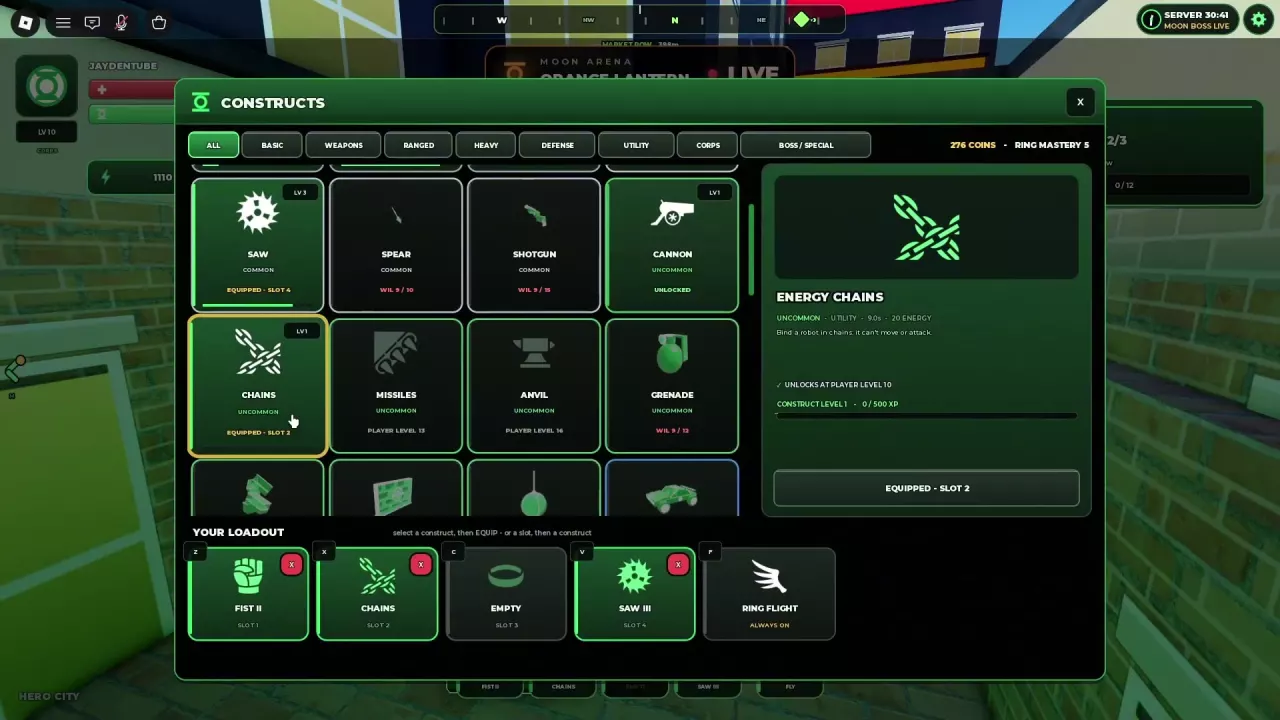
White crossed chain links for Energy Chains.

Energy Chains

Chains

Classification
Uncommon; Utility
Effect
Binds robots, preventing movement and attacks. (Ability description.)
Player level requirement
10 level (Displayed unlock requirement.)
Displayed Willpower requirement
—
Displayed Intelligence requirement
—
Displayed Energy attribute requirement
—
Displayed Ring Mastery requirement
—
Displayed coin requirement
—
Energy cost
20 Energy (Shown at construct level 1.)
Acquisition label
—
Ring restriction
—
More details
Displayed time parameter
9 seconds (Level 1 detail panel.)
Observed level
1 level (Green menu example.)
Displayed current XP
0 XP (Level 1 detail panel.)
Displayed XP target
500 XP (Level 1 detail panel.)
White circular saw blade icon.

Saw

Saw III · Saw IV

Classification
Common
Effect
A circular saw flies outward and returns; the return pass can hit enemies again.
Player level requirement
—
Displayed Willpower requirement
—
Displayed Intelligence requirement
—
Displayed Energy attribute requirement
—
Displayed Ring Mastery requirement
—
Displayed coin requirement
—
Energy cost
18 Energy (Displayed at levels 3 and 4.)
Acquisition label
—
Ring restriction
—
More details
Observed level
1 level (Early Green menu example.)
Observed level
3 level (Chains/Cannon loadout example.)
Observed level
4 level (Later menu and hotbar; Saw IV.)
Observed hit damage
41 damage (Green returning-saw example; not a fixed damage specification.)
Observed cooldown countdown
5 seconds (Gatling/Saw IV loadout example; remaining countdown, not necessarily the full cooldown.)
White jet aircraft icon.

Jet

Classification
Corps (Green menu example.)
Effect
Sends a glowing aircraft-shaped construct toward enemies. The player does not ride it.
Player level requirement
—
Displayed Willpower requirement
—
Displayed Intelligence requirement
—
Displayed Energy attribute requirement
—
Displayed Ring Mastery requirement
—
Displayed coin requirement
—
Energy cost
—
Acquisition label
—
Ring restriction
—
More details
Observed level
1 level (Unlocked in the Green loadout example.)
Ring before cast
50 % (Green cast example; not a fixed energy cost.)
Ring after cast
30 % (Same Green cast example.)
Observed cooldown countdown
7 seconds (The countdown decreases.)
Green multi-barrel Gatling Construct icon.

Gatling Construct

Gatling

Classification
Corps
Effect
Creates a rotating arm-mounted gun that sprays the target. (Ability description.)
Player level requirement
11 level (Green Ring only.)
Displayed Willpower requirement
—
Displayed Intelligence requirement
—
Displayed Energy attribute requirement
—
Displayed Ring Mastery requirement
—
Displayed coin requirement
—
Energy cost
24 Energy (Shown at construct level 1.)
Acquisition label
—
Ring restriction
Green Ring
More details
Displayed time parameter
8 seconds (Detail panel; the cast also shows a cooldown counting down from 8.)
Observed level
1 level (Green equipment example.)
Hit consistency
Hits can be inconsistent in street combat. (Street combat.)
Pink spiked burst icon for Rage.

Rage

Rage IV · Rage V

Classification
—
Effect
Area attack against nearby enemies; the slot enters cooldown after use. (Red loadout example.)
Player level requirement
—
Displayed Willpower requirement
—
Displayed Intelligence requirement
—
Displayed Energy attribute requirement
—
Displayed Ring Mastery requirement
—
Displayed coin requirement
—
Energy cost
—
Acquisition label
—
Ring restriction
—
More details
Observed level
4 level (Earlier Red loadout; Rage IV.)
Observed level
5 level (Later Prison Island hotbar; Rage V.)
Pink anvil icon for Anvil Drop.

Anvil Drop

Anvil · Anvil V · Anvil Drop V

Classification
Uncommon (Green menu example.)
Effect
—
Player level requirement
16 level (Displayed unlock requirement.)
Displayed Willpower requirement
—
Displayed Intelligence requirement
—
Displayed Energy attribute requirement
—
Displayed Ring Mastery requirement
—
Displayed coin requirement
—
Energy cost
—
Acquisition label
—
Ring restriction
—
More details
Observed level
5 level (Older Red loadout.)
Combat role
High-damage attack. (Qualitative assessment in the Red farming example.)
Pink missile launcher icon for Missile Pod.

Missile Pod

Missiles · Missile Pod III · Missiles III · Missiles V

Classification
Uncommon (Green menu example.)
Effect
Ranged attack. (Red loadout example.)
Player level requirement
13 level (Displayed unlock requirement.)
Displayed Willpower requirement
—
Displayed Intelligence requirement
—
Displayed Energy attribute requirement
—
Displayed Ring Mastery requirement
—
Displayed coin requirement
—
Energy cost
—
Acquisition label
—
Ring restriction
—
More details
Observed level
3 level (Older Red loadout.)
Observed level
5 level (Halloween and updated Red hotbar examples.)
Slender green spear construct.

Spear

Classification
Common
Effect
—
Player level requirement
—
Displayed Willpower requirement
10 points (Earlier card showing WIL 9/10.)
Displayed Intelligence requirement
—
Displayed Energy attribute requirement
—
Displayed Ring Mastery requirement
—
Displayed coin requirement
600 Coins (Later unlock-card stage.)
Energy cost
—
Acquisition label
—
Ring restriction
—
Green shotgun construct preview.

Shotgun

Classification
Common
Effect
—
Player level requirement
—
Displayed Willpower requirement
15 points (Earlier card showing WIL 9/15.)
Displayed Intelligence requirement
10 points (Later card showing INT 10.)
Displayed Energy attribute requirement
—
Displayed Ring Mastery requirement
—
Displayed coin requirement
—
Energy cost
—
Acquisition label
—
Ring restriction
—
Green round grenade with a top lever.

Grenade

Classification
Uncommon
Effect
—
Player level requirement
—
Displayed Willpower requirement
12 points (Earlier card showing WIL 9/12.)
Displayed Intelligence requirement
20 points (Later card showing INT 20.)
Displayed Energy attribute requirement
—
Displayed Ring Mastery requirement
—
Displayed coin requirement
—
Energy cost
—
Acquisition label
—
Ring restriction
—
Several green bricks in a construct preview.

Bricks

Classification
Uncommon
Effect
—
Player level requirement
—
Displayed Willpower requirement
15 points (Earlier card showing WIL 9/15.)
Displayed Intelligence requirement
—
Displayed Energy attribute requirement
20 points (Later card showing ENE 20; attribute requirement, not cast cost.)
Displayed Ring Mastery requirement
—
Displayed coin requirement
—
Energy cost
—
Acquisition label
—
Ring restriction
—
Green wall panel with a circular emblem.

Wall

Classification
Uncommon
Effect
—
Player level requirement
—
Displayed Willpower requirement
—
Displayed Intelligence requirement
—
Displayed Energy attribute requirement
25 points (Earlier display ENE 3/25; later display ENE 25. This is not a cast cost.)
Displayed Ring Mastery requirement
—
Displayed coin requirement
—
Energy cost
—
Acquisition label
—
Ring restriction
—
Green wrecking ball suspended from a cable.

Wreck

Classification
Uncommon
Effect
—
Player level requirement
—
Displayed Willpower requirement
35 points (Earlier display WIL 9/35; later display WIL 35.)
Displayed Intelligence requirement
—
Displayed Energy attribute requirement
—
Displayed Ring Mastery requirement
—
Displayed coin requirement
—
Energy cost
—
Acquisition label
—
Ring restriction
—
More details
Appearance
Suspended green wrecking ball. (Menu preview.)
Green car construct viewed at an angle.

Car

Classification
Rare
Effect
—
Player level requirement
—
Displayed Willpower requirement
20 points (Later menu.)
Displayed Intelligence requirement
—
Displayed Energy attribute requirement
—
Displayed Ring Mastery requirement
4 level (Earlier menu shows MASTERY 3/4.)
Displayed coin requirement
—
Energy cost
—
Acquisition label
—
Ring restriction
—
Green RPG launcher construct preview.

RPG

Classification
Rare
Effect
—
Player level requirement
—
Displayed Willpower requirement
40 points (Green menu example.)
Displayed Intelligence requirement
—
Displayed Energy attribute requirement
—
Displayed Ring Mastery requirement
—
Displayed coin requirement
—
Energy cost
—
Acquisition label
—
Ring restriction
—
A curved spread of thin needles.

Needles

Classification
Rare
Effect
—
Player level requirement
—
Displayed Willpower requirement
30 points (Green menu example.)
Displayed Intelligence requirement
—
Displayed Energy attribute requirement
—
Displayed Ring Mastery requirement
—
Displayed coin requirement
—
Energy cost
—
Acquisition label
—
Ring restriction
—
Green open hand construct with a palm emblem.

Slap

Classification
Legendary
Effect
—
Player level requirement
—
Displayed Willpower requirement
—
Displayed Intelligence requirement
—
Displayed Energy attribute requirement
—
Displayed Ring Mastery requirement
6 level (Green menu example.)
Displayed coin requirement
—
Energy cost
—
Acquisition label
—
Ring restriction
—
Green mechanical legs and feet for Smash.

Smash

Classification
Legendary
Effect
—
Player level requirement
—
Displayed Willpower requirement
—
Displayed Intelligence requirement
—
Displayed Energy attribute requirement
—
Displayed Ring Mastery requirement
8 level (Green menu example.)
Displayed coin requirement
—
Energy cost
—
Acquisition label
—
Ring restriction
—
Green locomotive construct viewed from the side.

Train

Classification
Legendary
Effect
—
Player level requirement
—
Displayed Willpower requirement
—
Displayed Intelligence requirement
—
Displayed Energy attribute requirement
—
Displayed Ring Mastery requirement
7 level (Green menu example.)
Displayed coin requirement
—
Energy cost
—
Acquisition label
—
Ring restriction
—
Gold Orbital Battery inventory icon.

Orbital Battery

BATTERY II

Classification
Legendary (Inventory detail panel.)
Effect
Hard-light emitters orbit the player and fire coordinated shots at the target for several seconds.
Player level requirement
—
Displayed Willpower requirement
—
Displayed Intelligence requirement
—
Displayed Energy attribute requirement
—
Displayed Ring Mastery requirement
—
Displayed coin requirement
—
Energy cost
—
Acquisition label
—
Ring restriction
—
More details
Emitter count
4 emitters
Equipment entry
Inventory → Orbital Battery → EQUIP IN CONSTRUCTS (For an owned copy.)
Observed level
2 level (Level-up notification during the Pumpkin King fight; hotbar becomes BATTERY II.)
Ownership observation
Owned in the Halloween inventory example. (Halloween inventory example.)
Pink leaping cat silhouette for Dex-Starr.

Dex-Starr

Dex-Starr II · Dex-Starr III

Classification
—
Effect
—
Player level requirement
—
Displayed Willpower requirement
—
Displayed Intelligence requirement
—
Displayed Energy attribute requirement
—
Displayed Ring Mastery requirement
—
Displayed coin requirement
—
Energy cost
—
Acquisition label
—
Ring restriction
—
More details
Appearance
Cat-shaped construct represented by a pink cat silhouette in Inventory.
Observed level
2 level (Earlier Halloween hotbar; Dex-Starr II.)
Observed level
3 level (Halloween hotbar example.)
Observed equipped key
X (Halloween and updated Red loadouts; configurable assignment.)
Green Titan Mech icon with a circular chest emblem.

Titan Mech

Classification
—
Effect
—
Player level requirement
—
Displayed Willpower requirement
—
Displayed Intelligence requirement
—
Displayed Energy attribute requirement
—
Displayed Ring Mastery requirement
—
Displayed coin requirement
—
Energy cost
—
Acquisition label
—
Ring restriction
—
More details
Appearance
Green blocky mech icon with a circular chest emblem. (Inventory card.)
Observed state
Owned construct listed in Inventory. (Halloween inventory example.)
White scattered droplet icon for Napalm.

Napalm

Napalm II

Classification
—
Effect
—
Player level requirement
—
Displayed Willpower requirement
—
Displayed Intelligence requirement
—
Displayed Energy attribute requirement
—
Displayed Ring Mastery requirement
—
Displayed coin requirement
—
Energy cost
—
Acquisition label
—
Ring restriction
—
More details
Observed level
2 level (NAPALM II in the updated Red hotbar.)
Observed equipped key
V (Updated Red loadout; configurable assignment.)
Gray multi-emitter icon for Legendary Battery.

Battery

Classification
Legendary (Legendary Battery card in the Green menu.)
Effect
—
Player level requirement
—
Displayed Willpower requirement
—
Displayed Intelligence requirement
—
Displayed Energy attribute requirement
—
Displayed Ring Mastery requirement
—
Displayed coin requirement
—
Energy cost
—
Acquisition label
BOSS DROP
Ring restriction
—
Gray lantern-shaped icon for Moon Boss Battery.

Battery

Classification
Boss / Special (Separate lantern-icon Battery card in the Green menu.)
Effect
—
Player level requirement
—
Displayed Willpower requirement
—
Displayed Intelligence requirement
—
Displayed Energy attribute requirement
—
Displayed Ring Mastery requirement
—
Displayed coin requirement
—
Energy cost
—
Acquisition label
MOON BOSS DROP
Ring restriction
—
More details
Appearance
Lantern-shaped menu icon.
Gray crossed-chain icon for Well.

Well

Classification
Legendary
Effect
—
Player level requirement
—
Displayed Willpower requirement
—
Displayed Intelligence requirement
—
Displayed Energy attribute requirement
—
Displayed Ring Mastery requirement
—
Displayed coin requirement
—
Energy cost
—
Acquisition label
BOSS DROP
Ring restriction
—
Gray pointed construct icon for Cyclone.

Cyclone

Classification
Legendary
Effect
—
Player level requirement
—
Displayed Willpower requirement
—
Displayed Intelligence requirement
—
Displayed Energy attribute requirement
—
Displayed Ring Mastery requirement
—
Displayed coin requirement
—
Energy cost
—
Acquisition label
BOSS DROP
Ring restriction
—
Gray swinging hammer icon for Colossus.

Colossus

Classification
Mythical
Effect
—
Player level requirement
—
Displayed Willpower requirement
—
Displayed Intelligence requirement
—
Displayed Energy attribute requirement
—
Displayed Ring Mastery requirement
—
Displayed coin requirement
—
Energy cost
—
Acquisition label
BOSS DROP
Ring restriction
—
Gray blocky torso icon for Mech.

Mech

Classification
Boss / Special
Effect
—
Player level requirement
—
Displayed Willpower requirement
—
Displayed Intelligence requirement
—
Displayed Energy attribute requirement
—
Displayed Ring Mastery requirement
—
Displayed coin requirement
—
Energy cost
—
Acquisition label
MOON BOSS DROP
Ring restriction
—
Gray curled dragon silhouette.

Dragon

Classification
Boss / Special
Effect
—
Player level requirement
—
Displayed Willpower requirement
—
Displayed Intelligence requirement
—
Displayed Energy attribute requirement
—
Displayed Ring Mastery requirement
—
Displayed coin requirement
—
Energy cost
—
Acquisition label
BOSS DROP
Ring restriction
—
Gray concentric circle icon with rays for Nova.

Nova

Classification
Boss / Special
Effect
—
Player level requirement
—
Displayed Willpower requirement
—
Displayed Intelligence requirement
—
Displayed Energy attribute requirement
—
Displayed Ring Mastery requirement
—
Displayed coin requirement
—
Energy cost
—
Acquisition label
BOSS DROP
Ring restriction
—
Gray diagonal lance and lightning icon.

Lance

Classification
Boss / Special
Effect
—
Player level requirement
—
Displayed Willpower requirement
—
Displayed Intelligence requirement
—
Displayed Energy attribute requirement
—
Displayed Ring Mastery requirement
—
Displayed coin requirement
—
Energy cost
—
Acquisition label
BOSS DROP
Ring restriction
—
Gray halo ring with three lightning bolts.

Halo

Classification
Boss / Special
Effect
—
Player level requirement
—
Displayed Willpower requirement
—
Displayed Intelligence requirement
—
Displayed Energy attribute requirement
—
Displayed Ring Mastery requirement
—
Displayed coin requirement
—
Energy cost
—
Acquisition label
BOSS DROP
Ring restriction
—
Gray anvil-shaped icon for Meteor.

Meteor

Classification
Boss / Special
Effect
—
Player level requirement
—
Displayed Willpower requirement
—
Displayed Intelligence requirement
—
Displayed Energy attribute requirement
—
Displayed Ring Mastery requirement
—
Displayed coin requirement
—
Energy cost
—
Acquisition label
BOSS DROP
Ring restriction
—
Gray clenched fist icon for Hands.

Hands

Classification
Boss / Special
Effect
—
Player level requirement
—
Displayed Willpower requirement
—
Displayed Intelligence requirement
—
Displayed Energy attribute requirement
—
Displayed Ring Mastery requirement
—
Displayed coin requirement
—
Energy cost
—
Acquisition label
BOSS DROP
Ring restriction
—

Energy Blast

Energy Blast II · Energy Blast III · Energy Blast V

Classification
—
Effect
Fires energy from the hand; independent of the equipped Fist construct.
Player level requirement
—
Displayed Willpower requirement
—
Displayed Intelligence requirement
—
Displayed Energy attribute requirement
—
Displayed Ring Mastery requirement
—
Displayed coin requirement
—
Energy cost
—
Acquisition label
—
Ring restriction
—
More details
Input
Mouse click (HUD attack prompt.)
Growth
Levels up during use; a level-up notification changes the HUD suffix.
Observed level
2 level (Green level-up example.)
Observed level
3 level (Green Gatling loadout HUD.)
Observed level
5 level (Older Red ranged-combat example.)
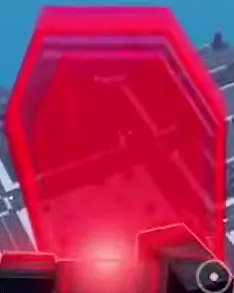
Translucent red polygonal shield raised in front of the player.

Shield

Energy Shield · Energy Shield III · Shield III · Right Click Shield

Classification
Defense (Older Energy Shield III card.)
Effect
Creates a shield with its own durability bar. You can block while moving, turning, and flying.
Player level requirement
—
Displayed Willpower requirement
—
Displayed Intelligence requirement
—
Displayed Energy attribute requirement
—
Displayed Ring Mastery requirement
—
Displayed coin requirement
—
Energy cost
—
Acquisition label
—
Ring restriction
—
More details
Input
Right mouse button (Updated controls; use Shift Lock.)
Configurable slots used
0 slots (Updated direct right-click Shield.)
Configurable slots used
1 slot (Older Red loadout; Energy Shield III occupies slot 3 and uses C.)
Observed shield capacity
60 shield points (Green combat example; build-specific capacity.)
Observed shield capacity
925 shield points (Halloween and updated Red examples; build-specific capacity.)
Observed remaining durability
727 shield points (Pumpkin King projectile-block sequence; maximum 925.)
Observed remaining durability
600 shield points (Later in the same projectile-block sequence; maximum 925.)
Observed remaining durability
476 shield points (Later in the same projectile-block sequence; maximum 925.)
Observed remaining durability
348 shield points (Approximate final reading in the same projectile-block sequence; maximum 925.)
Blocking example
Incoming Pumpkin King pumpkin projectiles explode against the shield, reducing shield durability while health remains unchanged. (Pumpkin King combat example.)
Observed level
3 level (Older Energy Shield III.)

Shield Envelop

Classification
—
Effect
Encloses the player in a protective sphere.
Player level requirement
—
Displayed Willpower requirement
—
Displayed Intelligence requirement
—
Displayed Energy attribute requirement
—
Displayed Ring Mastery requirement
—
Displayed coin requirement
—
Energy cost
—
Acquisition label
—
Ring restriction
—
More details
Input
Hold the left mouse button while blocking. (Updated direct-shield control scheme.)
Activated while blocking with
Shield (Hold the left mouse button.)

Find the construct you want, check its unlock conditions, and put it into your loadout. The directory covers 41 constructs and three inherent abilities, with practical instructions for equipping, using, and leveling them.

Lanterns Roblox Constructs: Abilities, Unlocks and Loadouts — illustrated cover

Press G to open Constructs and select an ability to read its current requirements. Unlocks can involve player level, attributes, Ring Mastery, Coins, your Corps, or drops. Click EQUIP and choose one of four slots, mapped to Z, X, C, and V. Use the red × to remove an equipped construct. Abilities level up through use; Roman numerals such as Fist II indicate their individual levels.

Search Abilities and Unlock Requirements

Search the directory by ability name or alias, then narrow the results by classification, ring restriction, or acquisition label. Expand More details for an entry's additional attributes and conditions.

In the game, press G or select the Constructs sidebar button. Browse ALL, BASIC, WEAPONS, RANGED, HEAVY, DEFENSE, UTILITY, CORPS, or BOSS / SPECIAL, then select the ability you want.

Read the selected card

  • Player level is your character's level requirement.
  • WIL, INT, and ENE refer to Willpower, Intelligence, and Energy attributes. WIL 9/10 means you have 9 Willpower toward a requirement of 10: you need one more point for that condition.
  • Ring Mastery is a separate progression requirement.
  • Coins, Corps restrictions, and drop labels identify other unlock conditions or acquisition paths.
  • An Energy attribute requirement is different from the Energy cost paid to cast an ability.

Recheck the detail panel as you progress. Spear can display Willpower 10 and later 600 Coins; Shotgun can display Willpower 15 and later Intelligence 10. These changing displays are not a choice between alternative requirements. Meeting one condition may leave another to satisfy.

Use the stat point planner when you need to close an attribute gap. After gaining Ring Mastery, reopen Constructs to check newly available abilities.

Equip, Remove and Replace Your Four Slots

Unlock or obtain the ability before adding it to your loadout.

  1. Press G to open Constructs and find YOUR LOADOUT at the bottom.
  2. To replace an ability, click the red × on its occupied slot.
  3. Select the construct you want and click EQUIP.
  4. Click the destination slot when prompted. You can also select the slot first, then select the construct.
  5. Check the EQUIPPED – SLOT confirmation and the updated loadout card.
Configurable slot Activation key
1 Z
2 X
3 C
4 V

Keys follow your assignments. Chains in slot 2 uses X; Cannon in slot 3 uses C. Moving either ability to another slot changes its key.

Ring Flight uses its separate F slot, marked ALWAYS ON, and leaves all four configurable slots available.

If you own Orbital Battery, open Inventory, select it under ALL or CONSTRUCTS, and choose EQUIP IN CONSTRUCTS to reach the equipment interface. Assign it to a loadout slot there.

Constructs menu showing Chains equipped in slot 2, red remove buttons, and the separate Ring Flight slot.

How Attacks and Utility Constructs Work

Click to fire Energy Blast, or press the assigned Z/X/C/V key to cast an equipped construct. Construct casts use Ring Energy, and a used slot dims while its cooldown counts down.

Direct attacks, returning hits and aimed strikes

Energy Blast fires energy from your hand and remains separate from Energy Fist, which launches a large fist-shaped construct through a loadout slot. Keep using the click attack when you want to attack between available construct casts.

  • Sword: Activate its slot to create and swing a constructed blade.
  • Saw: Launch it toward the enemy and account for both its outward path and return. The returning saw can hit again, making its travel path useful when positioning for another hit.
  • Hammer: Aim at the position you want to strike, then activate its slot. The giant hammer slams down at that location.
  • Jet: Send the aircraft-shaped construct toward enemies as an attack.

Control, explosive shots and group attacks

Chains binds robots so they cannot move or attack. Use that control window to set up another attack. Cannon charges and fires a heavy explosive shell, giving it a different role from a restraint ability.

For nearby groups, Rage provides an area attack. Anvil Drop offers a heavy hit, while Missile Pod, shortened to Missiles in the menu, provides a ranged option. Choose between them based on whether you need nearby coverage, a heavy strike, or reach.

Platform: create an elevated firing position

Platform has a displayed player-level requirement of 6 and costs 8 Energy at construct level 1.

  1. Equip Platform in a configurable slot.
  2. Press its assigned key to create a flat platform beneath your feet. If it is in slot 3, use C.
  3. Stand on the platform and angle your view toward enemies below.
  4. Attack from that elevated position.

Platform is useful when your immediate goal is a standing position above the street.

Gatling: Green Ring requirement and summoning

Gatling requires a Green Ring and player level 11. Its displayed cost at construct level 1 is 24 Energy.

Equip Gatling, face your target, and press its assigned slot key. A glowing green, multi-barrel gun appears beside your arm. Its ability description identifies it as a rotating gun that sprays the target.

Orbital Battery: coordinated fire

Orbital Battery is a Legendary construct. It surrounds you with four hard-light emitters that orbit your character and fire coordinated shots at your target for several seconds. Its sustained coordinated fire makes it worth considering when you want an additional ranged attack active around you.

Ability Levels and Roman Numerals

Use an ability during combat to raise its individual level. Open G → Constructs and select it to see its level and XP progress.

The Roman numeral in an ability's name indicates that ability's level: Fist II is level 2, and Saw IV is level 4. Energy Blast also gains levels through use, even though it is a separate click attack.

Keep the three progression systems separate:

Progression What it tracks
Player level Character progression, including player-level unlock requirements
Ring Mastery Separate ring progression used by mastery-gated constructs
Ability level An individual ability's growth through use

For example, leveling Fist does not satisfy another construct's player-level or Ring Mastery requirement. See the leveling and Ring Mastery guide for those progression paths.

Boss Drops and Inventory Constructs

Inventory's CONSTRUCTS category describes extremely rare construct drops from boss chests and Moon raids. In the directory, use the acquisition-label filter to find these groups:

  • BOSS DROP: Battery under Legendary, Well, Cyclone, Colossus, Dragon, Nova, Lance, Halo, Meteor, and Hands.
  • MOON BOSS DROP: Battery under Boss / Special and Mech.

There are two Battery menu cards. Identify the Legendary card by its BOSS DROP label. The Boss / Special card has a lantern-shaped icon and the MOON BOSS DROP label. Look up Orbital Battery by its full name as a separate inventory entry. Likewise, Titan Mech has its own entry, separate from the menu card named Mech.

For a chest purchase option, the Candy Shop's Legendary Chest costs 2,500 Candy and offers a chance at a Legendary construct you do not already own. Use its ODDS % button in Inventory to inspect the odds before opening it. Follow the chest guide for sources, storage, and opening steps, or the Moon raid guide for travel and participation.

Shield Controls and Choosing a Loadout

With Shift Lock active, right-click to raise Shield under the updated controls. It uses none of your four configurable construct slots. While blocking, hold the left mouse button to activate Shield Envelop, enclosing your character in a protective sphere.

Keep the shield facing incoming attacks and watch its separate durability bar. Older loadouts may show Energy Shield in slot 3 on C; that key belongs to the older slot assignment, rather than the updated direct shield control.

Choose your four constructs around the task ahead. Saw's return hit rewards lining up its path; Hammer suits an aimed strike; Chains adds control; Platform provides an elevated position. For specific choices and attack sequences, use these guides:

Search the wiki

Lanterns Roblox Corps: Ring Colors, Access and Separate SavesCompare all six Corps in Lanterns Roblox, learn how switching preserves separate saves, and unlock Orange Lantern with its 400 Robux game pass.Lanterns Roblox Constructs: Abilities, Unlocks and LoadoutsLook up Lanterns Roblox constructs, read unlock requirements, equip four ability slots, and learn how Platform, Gatling, Orbital Battery and ability levels work.Lanterns Roblox Stats Guide and Point Budget PlannerLearn what Lanterns Roblox stats affect, allocate and reset points, and use the stat point calculator to check your budget and each attribute’s 400-point cap.Lanterns Classes: Specialist vs VanguardCompare Specialist and Vanguard in Roblox Lanterns: class bonuses, Unformed status, example stat allocations, and which direction fits your combat style.Lanterns Roblox Construct Loadouts for Street Combos, Farming and Pumpkin KingChoose Lanterns Roblox construct loadouts for street combos, Rage and Anvil farming, or Pumpkin King, with slot assignments, stat advice, and energy tips.Lanterns Roblox Early Game Construct Tier ListChoose constructs for early Lanterns Roblox street quests. Compare Saw, Fist, Hammer, Chains and five alternatives, then build a practical four-slot loadout.Lanterns Roblox Leveling and Ring Mastery GuideFind Lanterns Roblox leveling areas, combine quests with extra XP sources, check Ring Mastery unlocks, and calculate the XP left on your current mastery bar.Lanterns Roblox PC Controls: Flight, Recharge and ShieldsLearn Lanterns Roblox PC controls: activate a dormant ring, fly with F, recharge with E, switch targets, block and use Shield Envelop.Lanterns Roblox Settings: Auto Suit, Ring Activation and AudioAdjust Lanterns settings in Roblox: turn off Auto Suit, keep your ring ready, wear your uniform manually, and control music, sound and recharge oaths.Lanterns Roblox Quests: Objectives, NPCs and Turn-InsFind Lanterns Roblox quest objectives, NPC locations, daily tasks and Halloween targets. Learn why Market Cleanup needs a return trip after 12/12.Lanterns Roblox Locations: Area Levels, Landmarks and TravelBrowse 20 Lanterns Roblox locations, compare area level signs, find city landmarks, and follow quest markers across the sea to Prison Island.Lanterns Roblox Enemy Locations, Quest Targets and Combat TipsFind all 11 Lanterns enemy types, match Halloween quest targets, and learn how to handle Thug health resets, harbor robots, and graveyard fights.Lanterns Roblox Bosses: Locations, Summons and RewardsFind Lanterns Roblox bosses, compare Moon raids and Halloween summons, check offering requirements, and learn how boss chests, titles and quest rewards work.Lanterns Roblox Moon Raids: Travel, Timers and ParticipationLearn how to reach the Moon in Lanterns Roblox, read boss timers and LIVE banners, qualify for a personal chest, and find Lantern Herald.Lanterns Roblox Boss Summoning Recipes and Offering PlannerFind all three Lanterns Halloween boss summoning recipes, calculate missing offerings, collect or buy materials, and use the Pumpkin Planet altar.Lanterns Roblox Pumpkin King: Summon, Fight and RewardsSummon Pumpkin King in Lanterns Roblox with 10 Bones and 20 Cursed Seed, attack vulnerable windows, block projectiles and finish Hunter Crane's quest.Lanterns Roblox Boss Damage CalculatorCalculate your boss damage contribution in Lanterns on Roblox, the 5% personal chest requirement, and how much more damage you need.Lanterns Roblox Resources: Currencies and Summoning MaterialsFind Candy and Lantern Coin sources in Roblox Lanterns, collect the four Halloween offerings, and reserve materials for your next boss summon.Lanterns Roblox Shops: Candy Items, Passes and Boost PricesFind Madame Hex and Lantern Shop in Roblox Lanterns, compare Candy items and Robux passes, and choose purchases for summons, leveling, drops or outfits.Lanterns Roblox Candy Budget GuideCalculate your Madame Hex shopping total in Lanterns Roblox. Budget for chests, offerings, and boosts, then find how much more Candy you need.Lanterns Roblox Chests: Sources, Storage and Opening GuideFind chest sources in Lanterns Roblox, check the boss damage requirement, and learn how to buy and open a Legendary Chest for 2,500 Candy.Lanterns Roblox Boosts: XP Stacking, Luck and DurationLearn how Lanterns Roblox boosts combine for 4x XP, how the 2x Luck cap works, which durations are available, and where to check your boost timer.Lanterns Roblox Halloween Event and Pumpkin Planet GuideFind Pumpkin Planet in Lanterns Roblox, locate quests and shops, choose Halloween activities, and learn trick-or-treating, Crimson Moon and Pumpkin Hunt rules.Lanterns Roblox Halloween Pass: Rewards and Event XP PlannerCheck Lanterns Roblox Halloween pass rewards for tiers 1–6, compare event XP sources, and calculate quests, enemies or bosses needed for your target.Lanterns Roblox Aura Previews: Halloween Appearance GuideCompare five Halloween aura previews in Lanterns Roblox, find Inventory > Auras, check lock status, and learn how aura display and saving work.Lanterns Roblox Titles: Collection and Known UnlocksBrowse all 11 Lanterns Roblox titles, preview Regular and Halloween styles, and learn how to get Supporter, Owner and Pumpkin King Slayer.Lanterns Roblox Suits: Corps Uniform and Halloween ShopFind Corps Standard in Inventory, press U to wear your Corps uniform, turn off Auto Suit, and locate Madame Hex's Halloween suit shop in Lanterns Roblox.CodesUpdates